Made a complex financial workflow flexible
I designed the consolidation experience end to end, turning backend-only calculation logic into a shipped product now live across 10 client organisations.
- Upload other intercompany transactions and balances
- Define threshold on elimination mismatch
- Map corresponding transactions and balances
- Eliminate transactions and balances
- Inter-company elimination GL report
Overview
- Role
- Senior Product Designer
- Team
- 1 PM · 2 engs · 2 SMEs · 6 external devs
- Year
- 2025
Problem
A 38-step consolidation process had real dependencies, but the work couldn't happen in a fixed sequence.
Direction
Working with two accounting practitioners, I mapped the dependencies and replaced the rigid workflow with a flexible model that enforced only the actual accounting requirements.
Impact
platform clients purchased Consolidation. All 10 purchasers are live.
01 · Problem & process
The process had an order. The work didn't.
Starting point
Financial consolidation combines a parent company and its subsidiaries into one set of financial statements across trial balances, adjustments, currency conversion, intercompany eliminations and goodwill.
When I joined, the calculation logic already existed in the backend, but there was no interface or workflow for users.
Why the sequence broke down
These activities have real dependencies. For example, you can't eliminate intercompany transactions before the data is uploaded, or produce final statements before the required adjustments are complete. But the work doesn't happen in one sitting; data from different companies can arrive over days or weeks.
Much of this work was managed in large Excel files, and the full process ran to 38 steps.
What couldn't change
Direct access to users wasn't available, and there was no existing product to learn from. I worked instead with two accounting practitioners who ran this process with clients, reviewing the workflow with realistic sample data throughout the project.
Aligning on the underlying process
The practitioners, developers, my PM and I had different ideas about the workflow. Rather than debate screens, I mapped the process, dependencies and edge cases with practitioners, then checked the technical constraints with developers.
That separated what accounting genuinely required from what we were free to change.
The first direction
Those different ideas became three concepts: a flat rail with my PM, an expanding list, and a pop-up checklist shaped by practitioner and developer input.
The screens changed, but users still had to work in order. If one input was missing, it could block other work that was ready.
Mapping the dependencies
I mapped all 38 steps, separating true dependencies from work that could begin as soon as its own data arrived. Nine submodules could run independently; Stage 3 stayed gated because the final calculations required all nine to be complete.
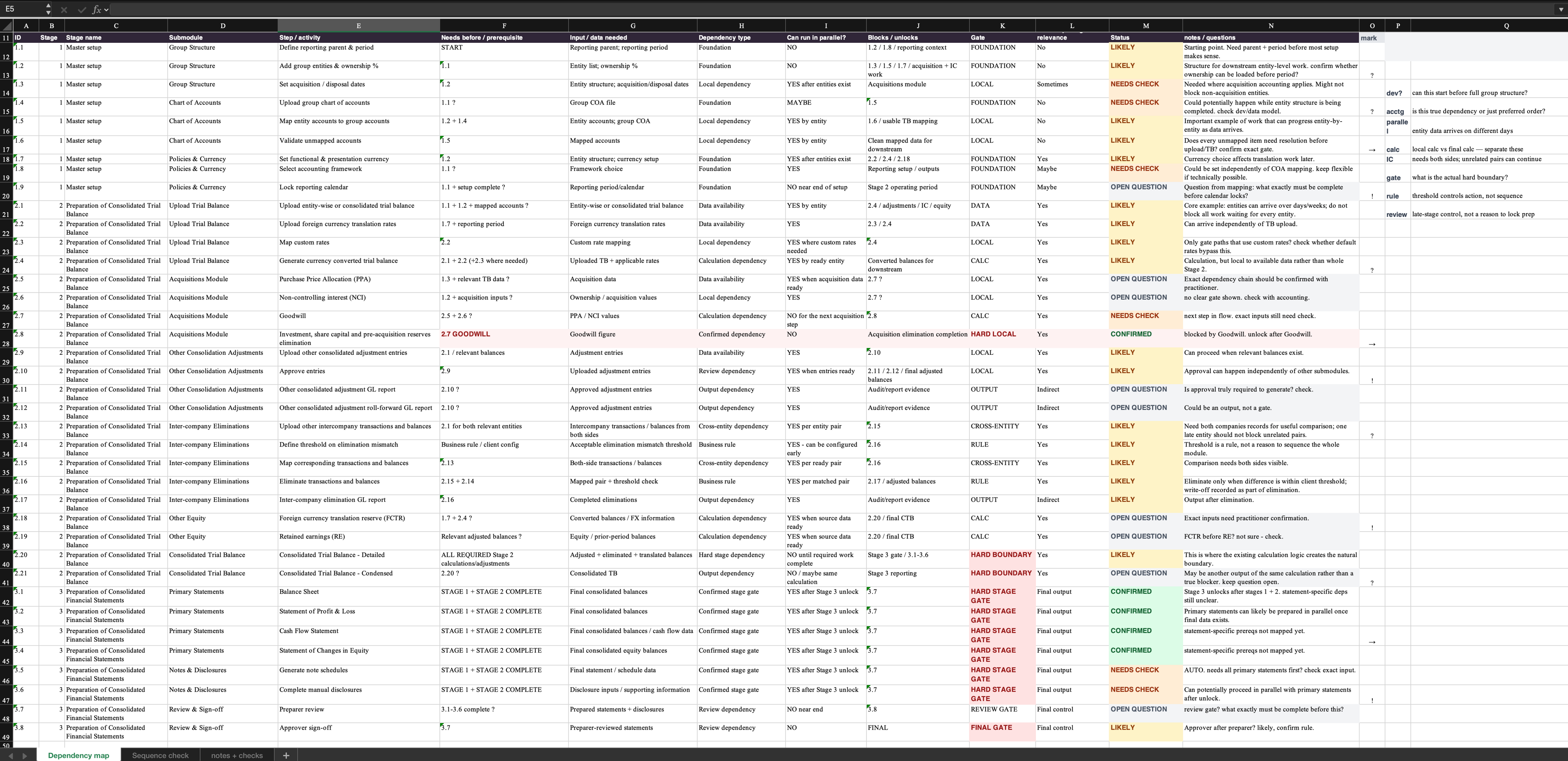
Final workflow
The final workflow had three stages and 12 submodules: 3 in Stage 1, 6 in Stage 2 and 3 in Stage 3. In the first two stages, users could work on any submodule that had the data it needed, save their progress and come back later. Stage 3 opened once the required submodules were complete.
Explore the working prototype of the final workflow, including its stages, submodules and dependency gates.
ZOOMING IN
From the overall workflow to intercompany elimination
The previous section covered the consolidation workflow: how users moved through steps and dependencies. Here, I zoom into one submodule, intercompany elimination, where users compare transactions across companies.
02 · Interaction Model
Both sides had to stay visible
Intercompany elimination matches transactions between two companies in the same group, then removes them from the consolidated statements so they aren't counted twice.
The same transaction could appear differently in each company's records, so users had to compare both sides before deciding what could be eliminated.
Three directions showed what the final model needed
One pairing at a time
Shaped by the existing backend flow
Each entity pair became its own step. Predictable, but users had to follow the queue even when another pair was ready to reconcile.
Overlay
Suggested by practitioners
Both companies stayed visible, but the reference overlay covered part of the working table users were trying to reconcile.
Company tabs
Explored with PM
Both companies stayed within reach, but only one table was visible at a time, so comparison still meant switching back and forth.
Together, the three directions made the solution clear: users needed to choose which two companies to work on, see both at the same time, and compare them without one table covering the other.
The final direction used a dual-panel workspace
Users could choose any two companies, compare their transactions side by side, and use running totals and the live difference to see whether the mapping balanced.
I worked through the model with the two accounting practitioners, then used the prototype with developers to make sure the accounting logic still worked in one workspace.
03 · Trade-off
Keeping both sides visible added a 15–30 second wait
The existing implementation loaded one company at a time, so it only prepared the data needed for that view. The dual-panel direction changed that: both companies had to be ready before the comparison could open. That added a 15–30 second wait.
Benefit
Both companies stayed visible while users compared and reconciled transactions.
Cost
Preparing both companies together added a 15–30 second wait and more implementation work.
Decision
Keep the dual-panel workflow and show a clear loading state while the data was prepared.
The developers, PM and I agreed that the easier comparison was worth the extra wait and implementation work.
04 · Business rules
Eliminate only unlocked when the conditions were met
Intercompany balances do not always match exactly. An earlier step set how much difference was allowed. All transactions also had to be mapped before users could run the elimination.
The interface checked both conditions. Eliminate only unlocked when mapping was complete and the difference was within the allowed threshold. After users ran it, the interface showed a processing state while the entries were posted.
Try it: click “Map Transactions,” then “Eliminate” once it unlocks.
05 · Outcome
Adoption after launch
platform clients purchased Consolidation
purchasing clients are live on the module
Our business head attributed part of the strong adoption of Consolidation to the workflow structure, which helped clients manage more of the consolidation process inside the product.
Client feedback
Agrawal Metal Works Pvt. Ltd
AMW said the product reduced the time needed to prepare financial statements and helped auditors complete reviews faster, contributing to a smoother closing cycle.
They also highlighted better accuracy and consistency, particularly the links between numbers and notes, trial-balance traceability, and built-in checks that were difficult to reproduce manually.
06 · Closing notes
What carried forward
Across products
Consolidation reused and adapted the interaction patterns, white-label system and component foundations already established across our GRC products.
Through the team
A junior designer joined later in the project and worked from the structure and patterns already in place while I continued leading the design.
First rollouts
After launch I moved onto another product. Next time I'd stay involved through the first client rollouts, track where users pause or need support, and use that evidence to test what we had validated with practitioners.